How Merry AI writes a structured GP consult into EMIS Web without DOM injection
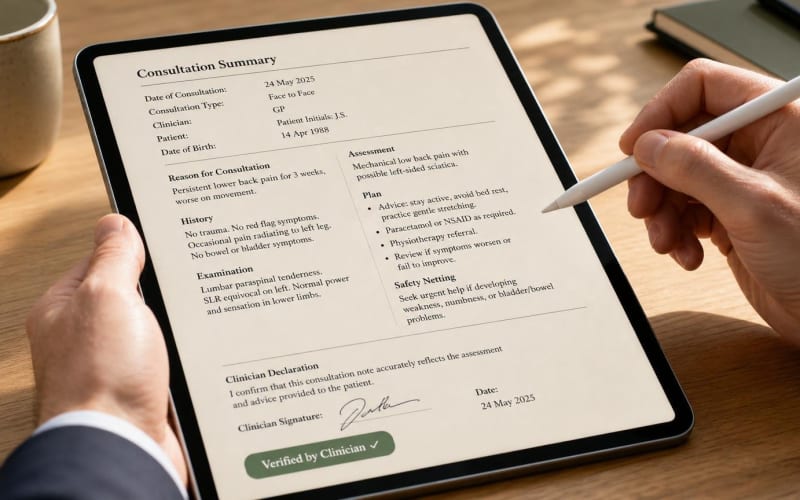
Merry AI writes into EMIS Web through a verified desktop hotkey that pastes the structured consult into the open consultation; EMIS Web is a desktop client with no browser DOM. The GP opens the consultation as usual, presses the hotkey, and the structured note lands in the field that has focus.
Nothing in this workflow touches a web page, an iframe or an HTML selector. The consult text and its SNOMED suggestions arrive as editable content. The GP reviews, corrects and confirms them before saving, exactly as they would with text they typed.
Why NHS GPs still retype consult narratives and hunt SNOMED codes after session end
A 10-minute consult generates a narrative, a set of results and at least one code. In many practices that narrative is retyped into the EMIS Web journal from memory or rough notes, and the GP then searches the SNOMED CT hierarchy for the right concept.
That retyping and code hunting rarely fits inside the appointment slot. It accumulates through the session and spills past session end, where coding and admin compete with tasks, results and correspondence for the same limited time.
Why browser extensions cannot reach the EMIS Web consultation window
Published SNOMED CT vendor case studies describe EMIS Web as a data centre based architecture with a thin client front end, deployed across over half of England's primary care practices. The GP consultation window is a native desktop application, not a browser tab.
A browser extension cannot write into EMIS Web, because the GP consultation window has no browser DOM to write into. Any scribe that claims Chrome DOM injection for EMIS Web is describing a mechanism the system does not expose.
The realistic routes into EMIS Web are an EMIS-provided integration layer, simulated keystrokes into the focused control, or clipboard paste triggered by a hotkey. Merry AI uses the verified hotkey paste, which keeps every insertion visible to the GP in the consultation itself.
Hotkey paste compared with API marketplace integration and manual copy-paste
Each approach to EMIS Web documentation trades off setup effort, visibility and coding support differently. The table below compares them on the points GPs and practice managers ask about most.
| Factor | Traditional API Marketplace Integration | Manual Copy-Paste | Merry AI Desktop Hotkey Paste |
|---|---|---|---|
| How text reaches EMIS Web | Through an EMIS-provided integration or API layer | GP retypes or copies text by hand | Verified hotkey pastes the structured consult into the open consultation |
| Uses browser DOM injection | No | No | No |
| SNOMED coding support | Depends on the integration | GP searches codes manually | SNOMED suggestions await GP confirmation |
| Structured HbA1c and QRISK3 | Depends on the integration | Typed by the GP | Structured in the consult for GP review |
| Audio handling | Depends on the vendor | No audio captured | Audio shredded from RAM the same day |
| Pricing | Not publicly listed | No software cost, GP time only | Discussed during a workflow audit |
The comparison shows where hotkey paste sits: it removes the retyping of manual entry while keeping the GP in control of exactly what enters the record, without depending on a marketplace integration.
HbA1c, QRISK3 and SNOMED suggestions arrive structured for GP confirmation
HbA1c is recorded in mmol/mol, the unit used in UK general practice, so the GP does not convert or reformat a value captured during the consult. QRISK3 is recorded as a percentage, keeping cardiovascular risk discussions consistent across the journal.
Each structured consult includes candidate SNOMED codes alongside the narrative. EMIS Web presents SNOMED CT through a familiar Read Version 2 style navigational hierarchy, and the GP selects, edits or rejects each suggestion there. No suggested code is saved without that confirmation.
Audio is shredded from RAM the same day and only GP-reviewed text enters EMIS
Consult audio is processed in memory and shredded from RAM the same day. Audio never becomes part of the EMIS Web record.
The only durable artefact is the consult text and the SNOMED codes the GP confirms. This limits what is retained to what the GP has reviewed, which supports the data minimisation expected of NHS practices under UK GDPR.
What the $14,300 modeled admin recovery figure assumes
The team estimates $14,300 per GP per year in recovered after-session admin time. This is a modeled estimate, not a guaranteed result.
The estimate assumes that time currently spent after session end retyping consult narratives and manually hunting SNOMED codes is recovered when structured consults are pasted by hotkey. Actual results vary with session volume, consult mix and how much coding a GP already completes in the room.
Every pasted consult remains a GP-attested record
The GP stays the author of every consultation. The hotkey places a draft in the field, the GP reviews it, confirms the SNOMED codes and saves it, so clinical accountability sits where it always has.
To see how hotkey paste fits your EMIS Web sessions, book a 15-minute workflow audit at https://cal.com/merryai/demo.